Voice feedback for classrooms
You became a teacher to be heard — not to type feedback into margins.
Speak a note on the page you already grade. Students click a link and hear your tone.
The video can’t play right now. The transcript below has every word.
Transcript
Some feedback takes a paragraph to write, and ten seconds to say.
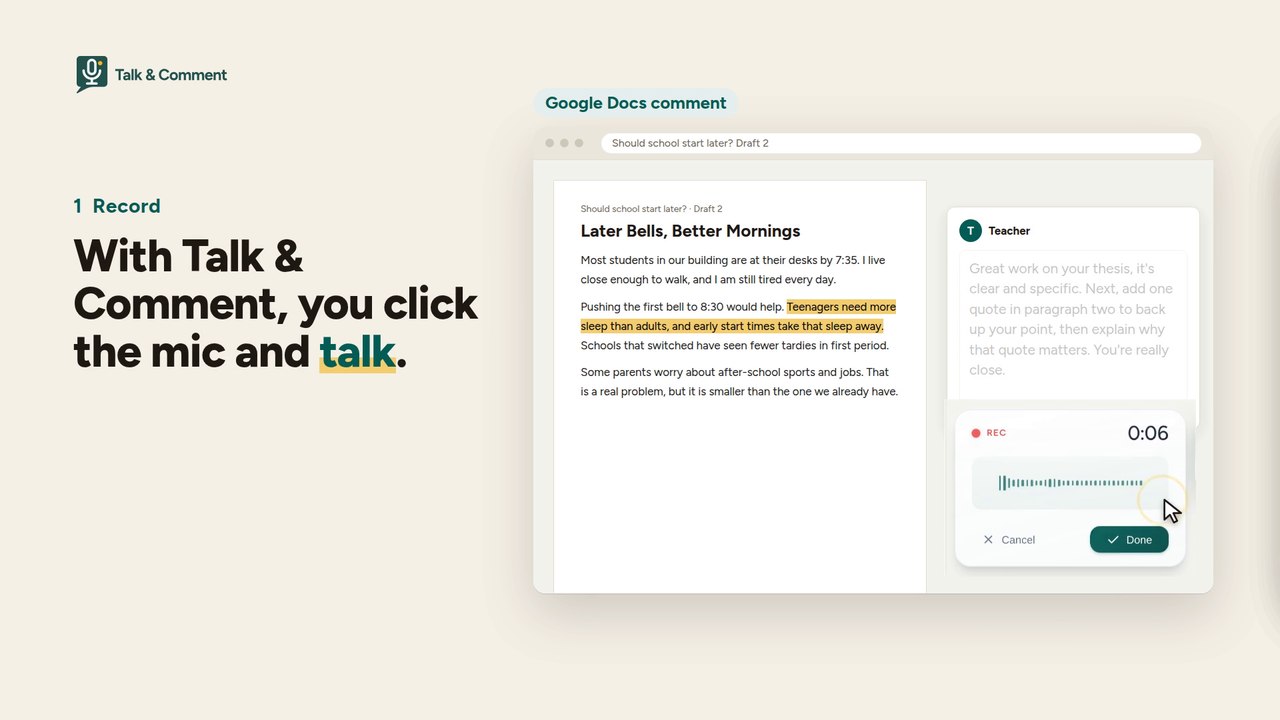
With Talk & Comment, you click the mic and talk.
You get a link. Paste it in a Google Doc comment, in your LMS, in an email. Anywhere you can paste a link.
Students click, and hear your tone. No install. No account.
With the extension, the link becomes a player, right on the page.
On paid plans, every note comes with a transcript and translation.
Talk & Comment. More than two hundred thousand people use it every week. Free to start.
The document, LMS, email and class post in the video are stand-ins, not a real classroom.
25 voice notes a month free. No credit card.
- HearNothing to install. No sign-in.
- TryPick a role, then your browser asks for microphone permission. Under 13 starts listen-only: no mic, no sign-in.
- KeepSign in to save and share your notes. Under-13 recording needs a parent or guardian’s consent first.
★ 4.2 · 5,800+ ratings on the Chrome Web Store
· 200,000+ weekly users
· Hundreds of millions of voice notes since 2013
· used in 160 countries
FERPA & COPPA controls · signed-DPA pathway for schools
Does this look like your grading week?
- A class set of essays goes home with you, and every one needs a paragraph in the margins.
- The big projects come in right before a break — and by the time students see your comments, the moment has passed.
- For your students with dyslexia, and your language learners, a written correction is one more thing to decode. A voice note isn’t.
- A short typed comment lands colder than you meant it. Tone doesn’t survive text.
Sound familiar? It isn’t a you problem — and it isn’t an organization problem either.
The problem isn’t how fast you type. It’s what typing throws away.
A margin comment keeps your judgment but strips out your voice — the encouragement, the emphasis, the “you’re close.” That’s the part students respond to, and it’s the part written feedback can’t carry.
Talk & Comment puts it back, without changing where you work:
- Record in the page you’re already grading — the extension adds a mic to Docs, Slides, Forms, Classroom, Canvas, Schoology, any browser page.
- Share a link — one click copies it the moment you stop recording.
- They press play — in any browser, on any device. No install, no account, nothing new for students to learn.
Feedback students actually listen to.
When feedback arrives as your voice, it gets played — and replayed. In the most recent 90 days we measured, teachers recorded 28,105 voice notes, and those notes were played 160,228 times — about three people listening for every teacher who recorded.
How that happens:
- Your tone does the teaching. “Fix this” sounds like help, not a verdict.
- Speaking is faster than typing a paragraph of the same feedback.
- Transcripts come along on paid plans, so spoken feedback stays searchable and accessible — and translatable into 20 languages for families.
Great for teaching. Works well with Google Classroom. Can also be used effectively and easily by students with dyslexia on tests, etc.
It has facilitated my work while evaluating my students. I also like how my voice sounds.
Such a useful extension! I wish I had found out about this years ago.
Step by step
Three steps. First note in your first sitting.
Record a voice note where you already review student work.
Step 1
Install the extension
Free, no credit card.
Step 2
Click the mic and talk
We host the audio and handle the transcript.
Step 3
Share the link
Students hear you where they already work.
Hear it for yourself
A voice note beats red ink.
Students don’t just see what to fix — they hear your encouragement. This is a 12-second sample of feedback you can record in your own voice in under a minute.
What Talk & Comment actually is
The two-minute version for the colleague who asks.
- A Chrome extension (Manifest V3, v4.x, ~833KB) records in-page — Chromebooks, Windows, Mac, Linux. Signed in to the TAC web app, you can also record with the built-in browser recorder, no extension needed. Listening never requires an install.
- Recording surfaces: Google Docs, Slides, Forms, Classroom, Canvas, Schoology, Blackboard, Moodle, Brightspace, Teams, and any other browser page.
- Listeners need nothing: shared links play inline in any modern browser, including phones. No student install, no student account. And when you open a space for responses, listeners can reply — in text or with a voice note — after typing just their name.
- Roles & safety: under-13 users are read-only by default; recording for them requires guardian consent.
- AI features on paid plans: transcripts, translation into 20 languages, and AI summaries — included from Teacher Plus up. AI processing uses Amazon Web Services, Inc., subject to account entitlements and organization AI settings. For a school or district that has a signed agreement with a later start date, the change takes effect on the date in that agreement. TAC-hosted processing is no longer available after the applicable cutover — every processor is listed on our sub-processors page, and schools get advance notice and an opt-out before any processing change.
- Extension languages: English, Spanish, French, Portuguese (BR), Arabic.
- Limits, plainly: Free = 25 recordings a month, 3 collections. On Free, recordings are kept for at least 90 days. After that, we may remove older ones, starting with those nobody has played recently. Paid plans keep everything while you're subscribed. Teacher Plus raises the caps — 100 a month, 10 collections. Recordings are kept for as long as you stay subscribed. If your plan ends, Free terms apply: recordings are kept for at least 90 days after that. Teacher Pro removes the caps. Recordings are kept for as long as you stay subscribed. If your plan ends, Free terms apply: recordings are kept for at least 90 days after that. District accounts are governed by their DPA retention terms.
Rolling this out for a school or district?
Everything your privacy review will ask for, up front. If you’re the teacher champion evaluating this for a department or school, start here too.
- Signed DPAs already in force — including the SDPC 15-state NDPA, a Minnesota cooperative agreement covering its 60+ member districts, the Idaho 1EdTech DPSA, and the California NDPA (CITE). Active coverage spans 18 states today — check the list for yours.
-
Student-data posture: US-only hosting and storage; encryption in transit (TLS 1.2+) and at rest (AES-256); Google sign-in requests only
emailandprofile— no Drive, Classroom, or Gmail access. - AI processing you can audit: student recordings use AWS Bedrock only when the district, school, or team enables AI. For a school or district that has a signed agreement with a later start date, the change takes effect on the date in that agreement. TAC-hosted processing is no longer available after the applicable cutover. Your district policy can disable AI entirely; sub-processors are published, and districts get advance written notice plus an opt-out before any change in where student audio is processed.
- No data selling, no behavioral ads. Breach notification to affected districts within 72 hours; no breach on record.
- Deployment: Google Admin Console rollout support, centralized billing, an admin console with usage reporting for your team or district admins, and 1:1 onboarding.
- Honest limitation: TAC is a small independent company without SOC 2 certification; it runs on SOC 2-certified infrastructure (AWS, DigitalOcean) and we’ll walk your IT team through the full security plan.
Docs: Data security plan · Sub-processors · Privacy policy · Breach & retention
Try it with one class set.
The Free plan is 25 voice notes a month — about one round of feedback for one class. No credit card, no trial clock. On Free, recordings are kept for at least 90 days. After that, we may remove older ones, starting with those nobody has played recently. Paid plans keep everything while you're subscribed.
That’s the whole experiment: grade one assignment out loud. If your notes get played the way other teachers’ notes do, you’ll know within a week — and if a month’s feedback outgrows 25 notes, that’s exactly what Teacher Plus is for.
Students and families don’t install anything — they open the shared voice link and listen inline.
Get back to the part where they hear you.
You have the voice. Your students are one link away from it.
25 voice notes a month, no credit card · FERPA & COPPA controls · data security plan.